
EngageIQ · AI Call QA · QualifAI
Score every call. Coach the moments that matter.
Manual QA leaves most of the floor unheard. EngageIQ turns completed calls into a five-category QualifAI scorecard, lets people calibrate the result, and adds PII Guard for regulated transcript data - all beside the dial and recording.
The problem
Your QA program should see the whole floor.
The old workflow samples a few recordings, ships the rest to another platform, and calls keyword matches intelligence. High-volume outbound teams need a consistent scorecard connected to the call, the agent, and the outcome.
The calls you never hear
Manual review rewards whoever gets sampled. Coaching gaps, compliance misses, and weak closes can repeat across the rest of the floor before a manager sees the pattern.
Another bill. Another blind spot.
Bolt-on QA adds seats, uploads, and a separate reporting layer - then leaves quality scores disconnected from the dial, recording, connect rate, and CPA that created them.
Keywords are not a scorecard
Finding a phrase is not the same as judging the conversation. Managers need plain-language rubrics for greeting, compliance, product knowledge, objection handling, and the close.
Inside Recordings QA
QualifAI Scorecard on every recording
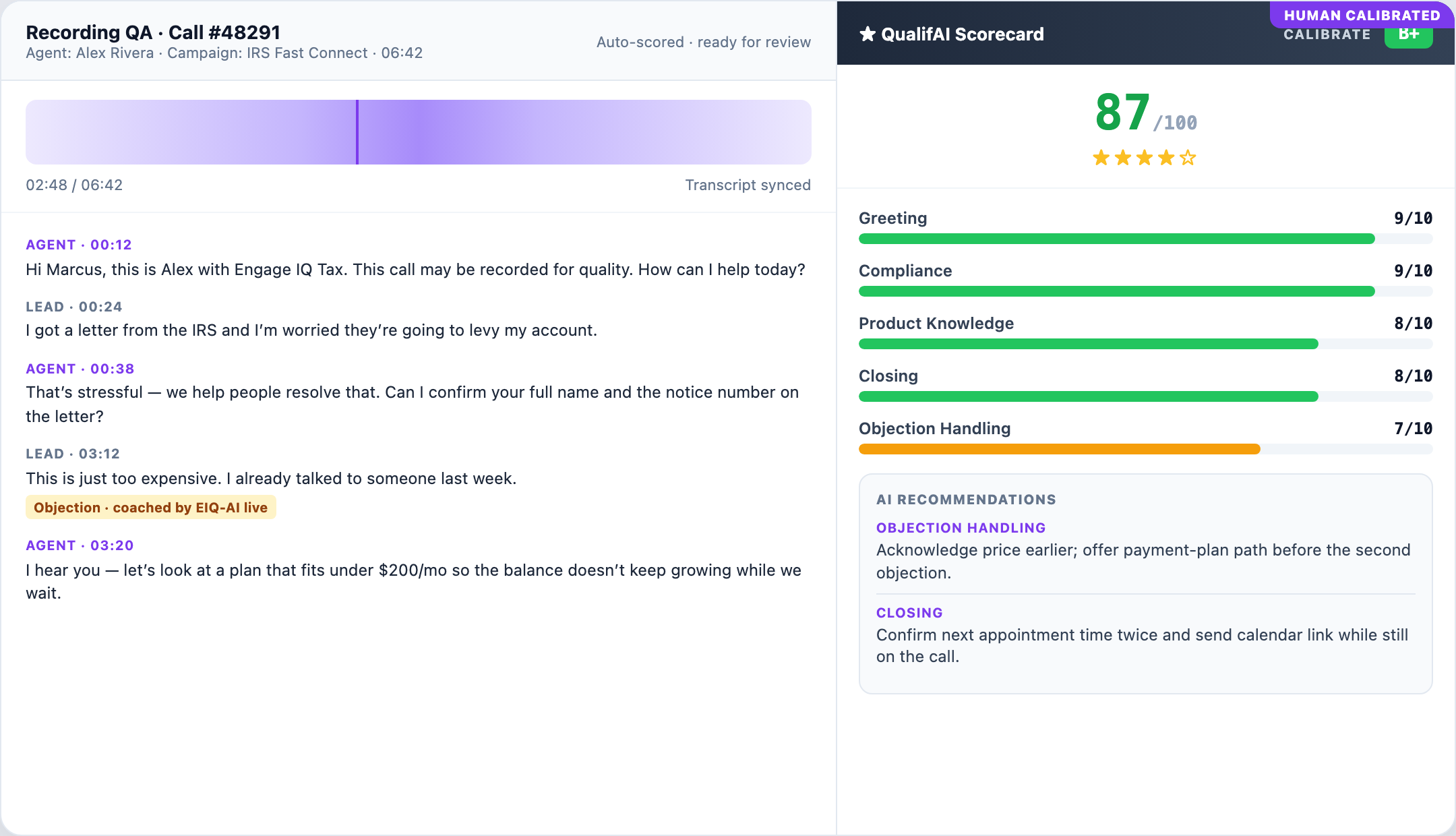
Each completed call can move through one review path: recording, transcript, five-category QualifAI scorecard, human calibration, and PII Guard for regulated transcript data.
Five scored categories
Greeting, compliance, product knowledge, closing, and objection handling roll into one consistent scorecard.
Synced to the recording
Review agent and lead lines in context on the same call record as the dial that produced them.
Coachable next steps
Recommendations point managers toward weak moments so review starts with a useful signal instead of a blank page.
Human override with reason
QA leads can edit scores, record why, and mark the scorecard as human calibrated. AI proposes; people own the standard.
Redacted by default
Regulated tokens are redacted from the transcript view. Raw transcript access requires a reason and is written to the audit trail.
How it works
Record. Score. Calibrate.
Keep the call in context
The recording and transcript stay connected to the agent, campaign, and disposition.
Apply one clear rubric
QualifAI evaluates the five categories consistently across completed calls.
Put people on the exceptions
Managers review the moments that matter, override with a reason, and reinforce guidance with AI Co-Pilot.
Native vs bolt-on
Quality intelligence belongs with the call.
| What your team needs | EngageIQ AI Call QA | Standalone QA platform |
|---|---|---|
| Completed-call coverage | Automated scorecard workflow | Separate ingestion or integration |
| Scorecard | Five-category QualifAI rubric | Separate forms and configuration |
| Human calibration | Override with reason | Varies by product |
| Transcript protection | PII Guard redacted view | Separate policy and controls |
| Live coaching | AI Co-Pilot on the call | Often another product |
| Dialer context | Native EngageIQ workflow | Bring your own dialer |