
EngageIQ · AI Co-Pilot
The next best action. Right on the call.
Power users love EngageIQ’s real-time control. They hate the operator maze around it. AI Co-Pilot puts the live transcript, compliance flags, and ready-to-use talk tracks beside the lead - so agents get clarity without another tab, tool, or expert.
What power users told us
Keep the power. Remove the friction.
Power users described EngageIQ as exceptionally valuable once mastered. Their frustration was the maze: too many setup steps, unclear status, and outside tools to understand call quality. AI Co-Pilot solves the in-call part by surfacing the next action where agents already work.
Real-time control
Power users value precise control over who agents speak with and when. AI Co-Pilot carries that control into the conversation without taking the agent out of the driver’s seat.
Guidance in the workflow
Transcript, compliance context, and talk tracks appear beside the live call - not in Monday’s review and not inside a separate transcript tool.
Expert-only operation
The live-call decision stays simple: use the suggestion or skip it. Advanced routing and configuration stay out of the agent’s moment.
Source: EngageIQ power-user discovery interviews · 2026
Inside the agent workspace
Transcript. Alerts. Next-best actions.
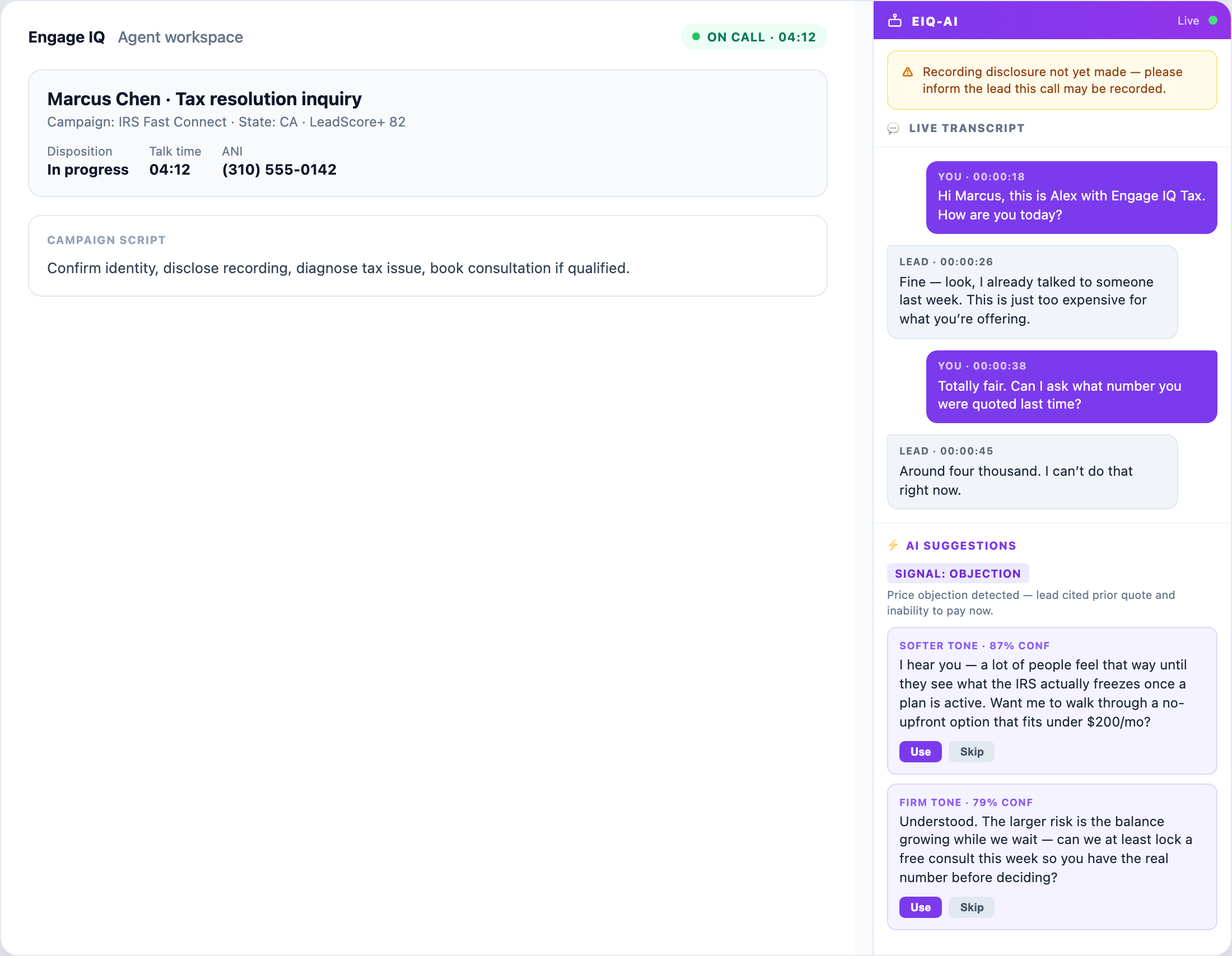
One call surface brings the conversation, the risk, and the recommended response together - while the agent keeps the final say.
Follow the conversation as it happens
Speaker-labeled lines and timestamps give agents immediate context while the call is still open.
See the missing step before hang-up
On-call alerts surface moments such as an outstanding recording disclosure while there is still time to act.
Recognize intent and objections
Conversation signals help identify what the lead is reacting to and why the next response matters.
Use it or skip it
Ready-to-use talk tracks arrive with clear controls. Agents can use the response or dismiss it - without surrendering judgment.
How it works
Listen. Surface. Choose.
Transcript + signals
Both sides of the call feed the Co-Pilot lane as the conversation unfolds.
Context in the moment
Compliance alerts and talk tracks appear beside the lead card - no second application.
The agent stays in control
Use accepts the talk track; Skip dismisses it. Pair the result with AI Call QA on the same call record.
Native vs bolt-on
Coaching belongs with the call.
| What your team needs | EngageIQ AI Co-Pilot | Typical coaching add-on |
|---|---|---|
| Real-time agent assist | Inside the agent workspace | Separate guidance layer |
| Live transcript | Beside the active call | Often a second product UI |
| Compliance context | On-call alerts | Separate checklist or flag |
| Agent control | Use / Skip on suggestions | Varies by product |
| Post-call QA | Connected to AI Call QA | Additional integration |
| Dialer context | Native EngageIQ workflow | Bring your own dialer |